WIN Reality Mobile App Relaunch: SwingConnect
SwingConnect is a youth baseball training app designed to empower players and their parents with AI-powered swing analysis and personalized insights.
- Role
- Lead Product Designer, I led the end-to-end design of the onboarding experience, including:
- Led research & strategy to optimize user activation, conducting user interviews and synthesizing insights.
- Designed and tested onboarding wireframes, and high-fidelity mockups, UI, and UX copy.
- Collaborating with cross-functional teams, including developers and stakeholders, to align on goals and ensure feasibility.
- Iterating on designs based on feedback and testing.
- Duration
- September 2024 - January 2025
Overview
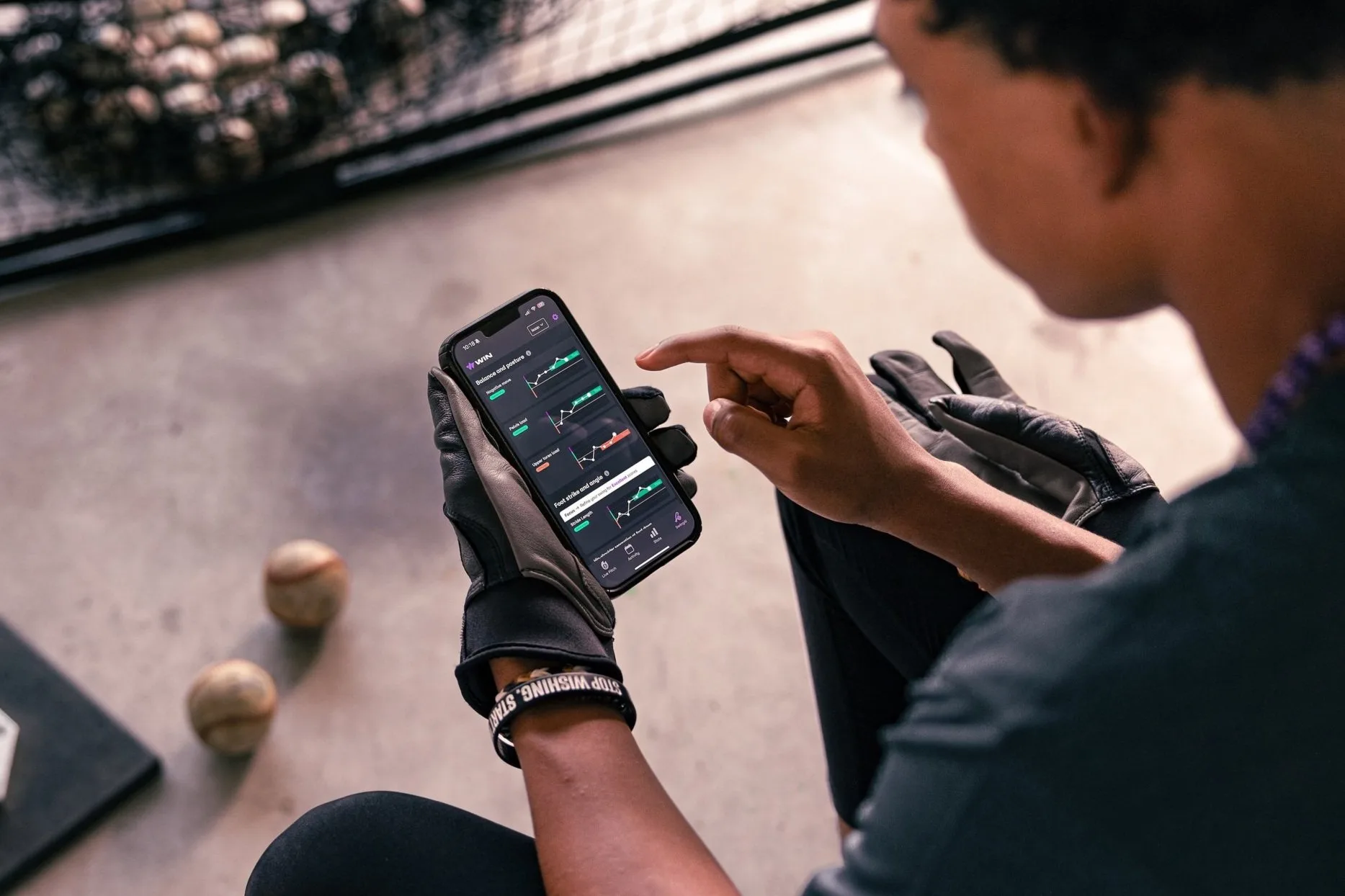
The app breaks down baseball swings into three key phases—Load, Stride, and Swing—to pinpoint biomechanical flaws and provide actionable solutions. This redesign aimed to enhance usability, improve engagement, and establish SwingConnect as an indispensable tool for youth baseball development.
Problem Statement
How might we create an onboarding and training experience that motivates and empowers parents, coaches, and players to believe in player potential, while providing immediate value and actionable insights?
Redesign Goals
Parents and players often feel overwhelmed when trying to improve swing mechanics. Existing onboarding flows failed to demonstrate immediate value.
User Needs:
- Reducing friction during account creation and swing upload.
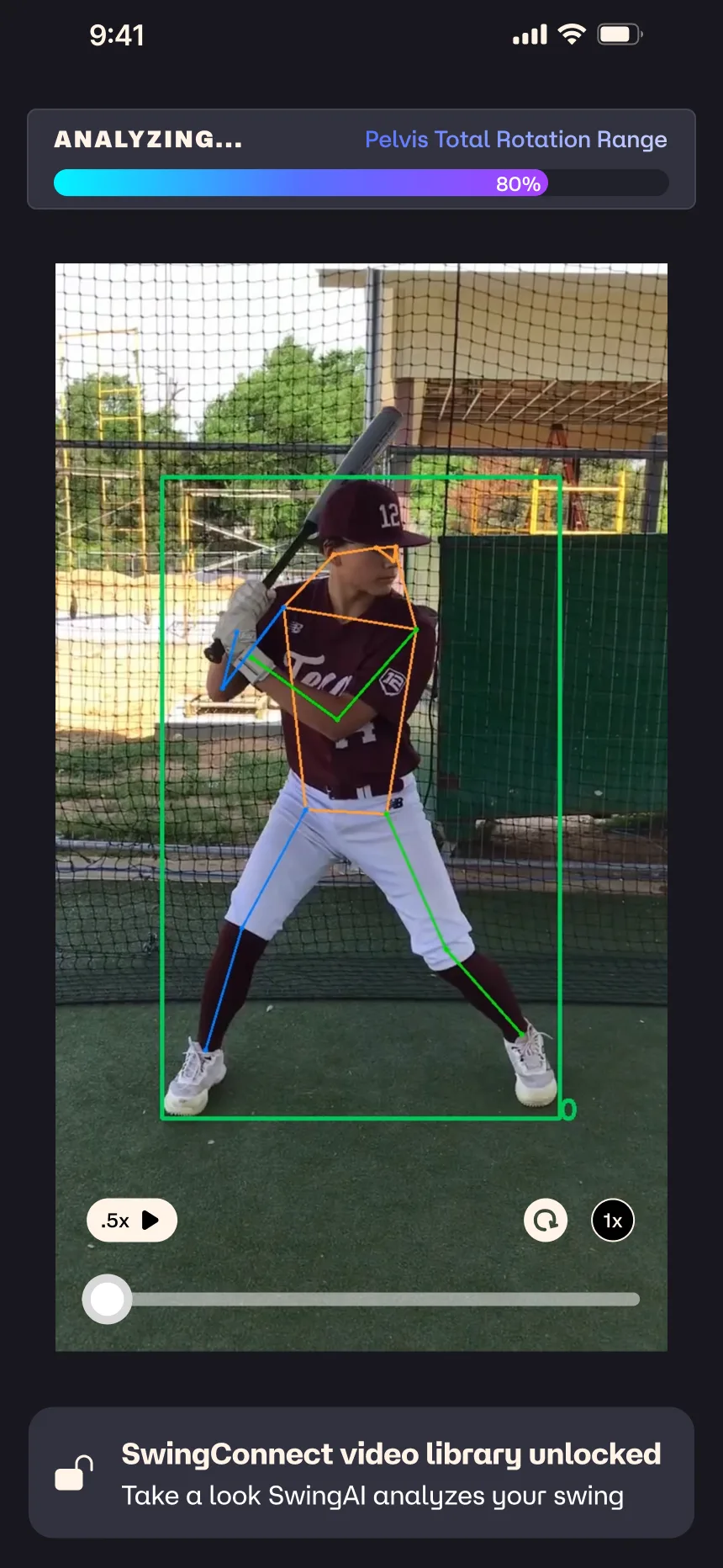
- Engaging users during the AI processing time (90 seconds).
- Clearly communicating the app’s value proposition within the first interaction.
Business Goal
Improve user activation by ensuring parents and players upload a swing video in their first session, reducing drop-off and increasing long-term engagement.
Primary KPI(s):
- Completion Rate: % of users successfully uploading a swing video during onboarding.
- Time-to-Value (TTV): Speed at which users experience their first swing analysis results.
- Retention Rate: % of users returning to upload subsequent swings within 7 days.
Objectives
01 Deliver Immediate Value
Provide actionable insights during onboarding and analysis.
02 Enhance Usability
Simplify the swing analysis process with intuitive visuals and clear language.
03 Build Confidence
Empower parents to support their players through tailored guidance.
04 Encourage Engagement
Foster repeat use through progress tracking and motivational content.
Process
As the Lead Product Designer, I played a central role in guiding the redesign of SwingConnect from research and user experience definition to prototyping, testing, and implementation.
I collaborated closely with cross-functional teams, facilitated workshops, conducted iterative user testing, and refined features based on insights to enhance engagement and usability.

Research and Insights
The redesign began with stakeholder interviews, competitive analysis, and user research to uncover pain points and opportunities. I synthesized findings from these research efforts into actionable insights that shaped the app’s user experience strategy.
Methodology:
- Conducted interviews with coaches and parents to understand pain points.
- Analyzed existing data on user engagement and conversion rates.
- Created personas and journey maps to define user behavior.
User Pain Points
- Parents feel unprepared to help their children improve and need clear, actionable guidance.
- Unclear value proposition—users don’t immediately understand how the app helps.
- Drop-off before swing submission—requiring sign-up before seeing results created friction.
Behavioral Data
- Users who uploaded a swing within their first session were 3x more likely to return.
- Users who dropped off before swing upload cited confusion about next steps or lack of immediate value.
Competitor Benchmarking
- Compared onboarding flows of baseball training and fitness apps.
- Best-in-class apps show value first before requiring sign-up.
- Effective apps break onboarding into small, engaging steps rather than overwhelming users upfront.
Persona Creation
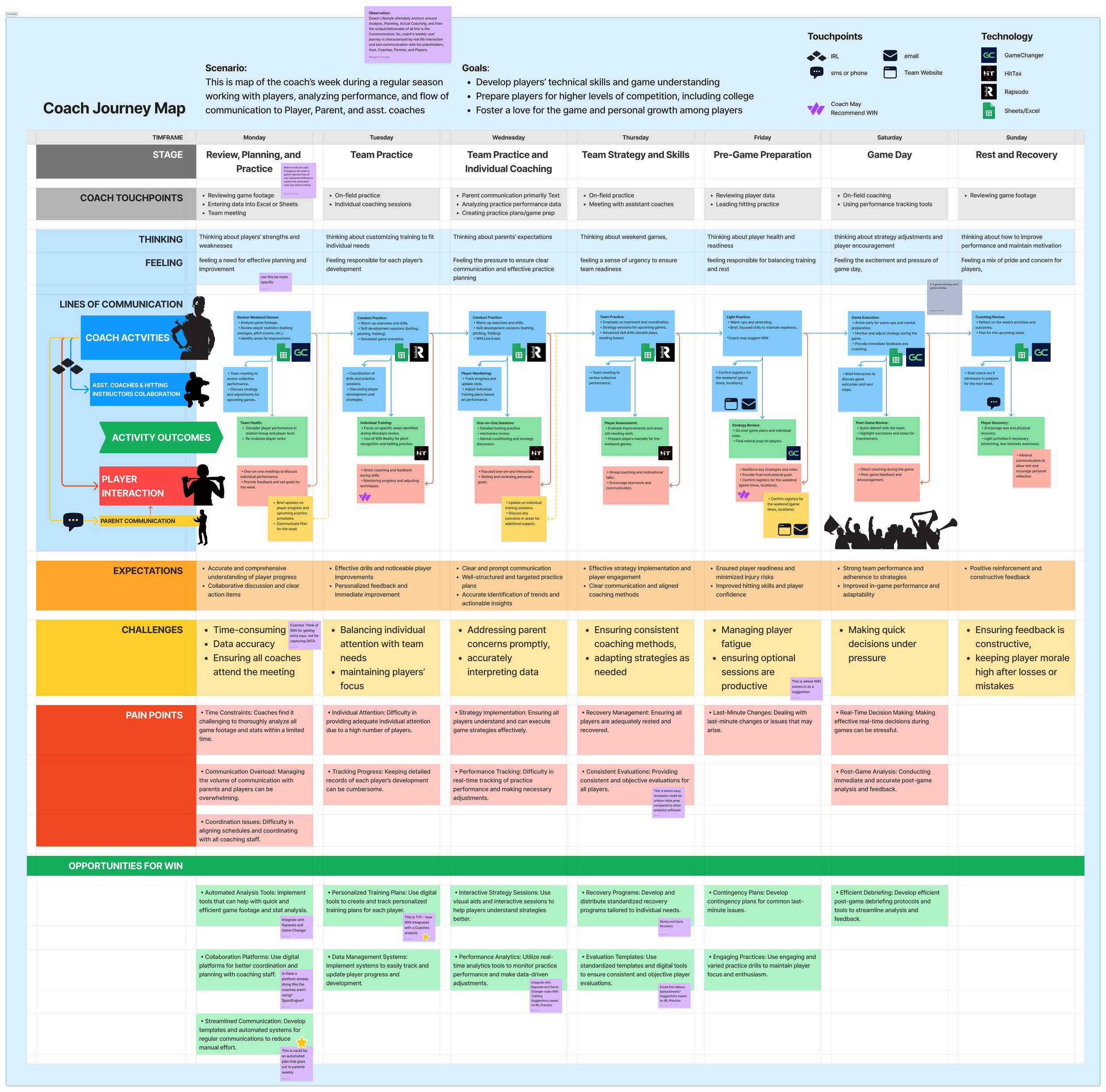
I interviewed 20 parents and coaches of players aged 12 and under to understand their weekly experiences. This helped create a map of a typical mid-season week and detailed profiles to inform the product experience framework.
A detailed journey map highlighted critical touchpoints across all personas:
- Planning and communicating training & weekly progress,
- Game-Day preparation, pain points included time-consuming data analysis and inconsistent feedback loops.
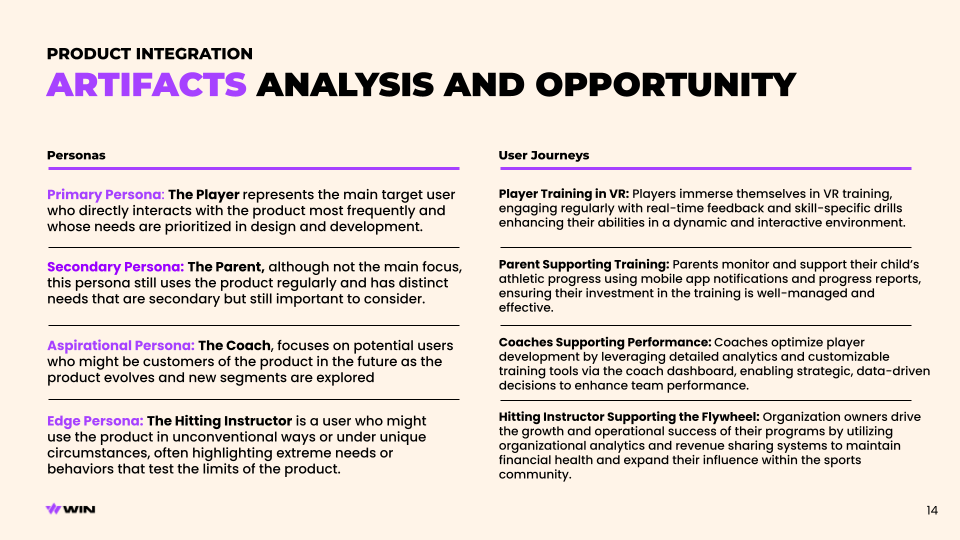
I created 3 personas, zeroing in on Parents as the largest group and user with the most challenges and therefore opportunities to solve for.
- Parents: Seek tools to guide their child’s improvement with confidence.
- Players: Want to build skills, track progress, and gain recognition.
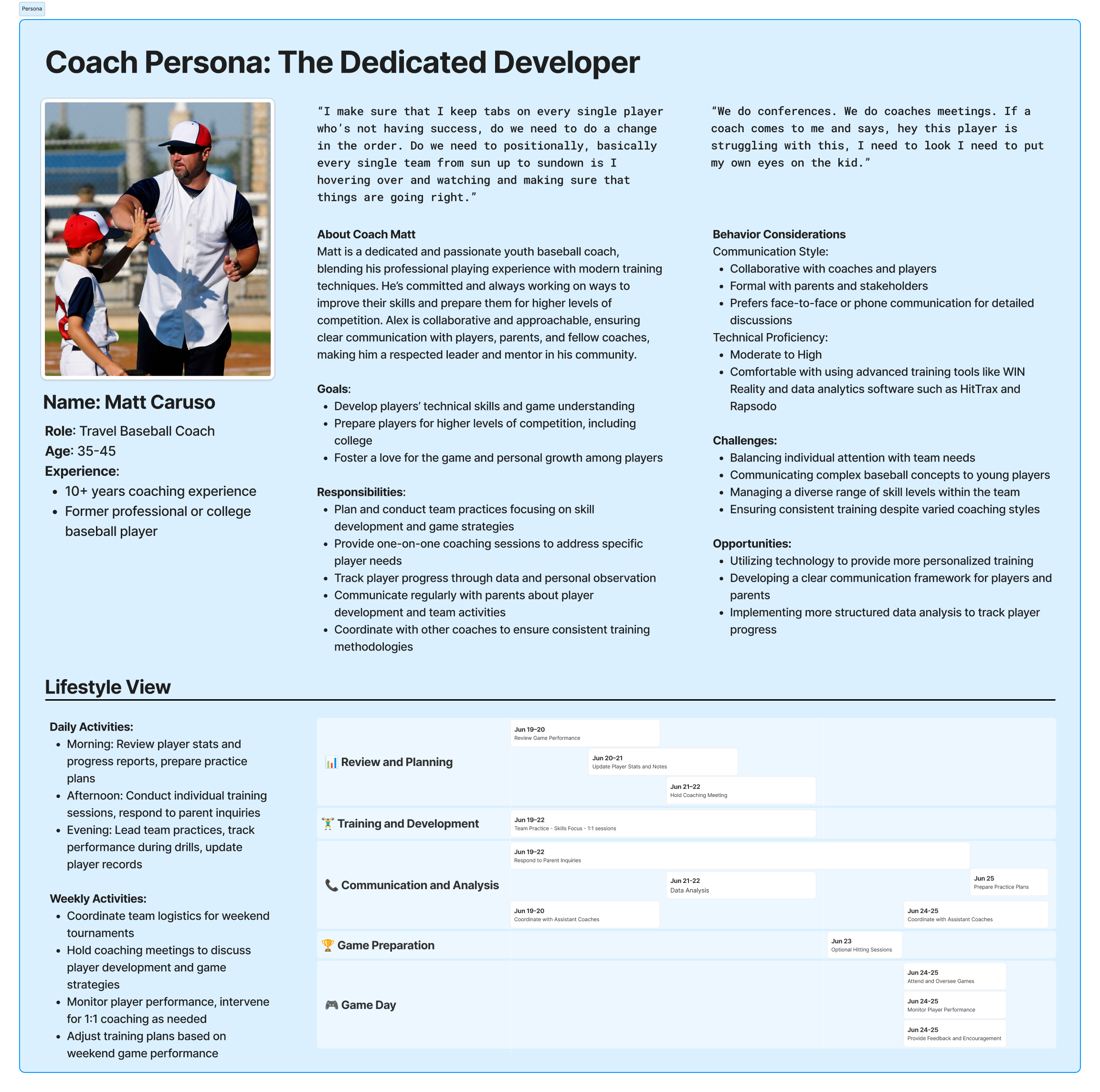
- Coaches: Require efficient tools to support individual and team development.
Presentation excerpt
 View fullsize
Persona Example - Coach
 View fullsize
Mid-Season Experience Map
 View fullsize
Key Findings
Initially, we decided to focus on Parents as the core persona, they were the largest segment and often in control of our user’s finances. Specific parent needs:
- Emotional Triggers: Parents and coaches desire clear, actionable feedback to help their players improve.
- Barriers: Overwhelming technical jargon and lack of immediate results lead to user drop-off.
- Opportunities: Leveraging AI-driven video analysis and contextualizing improvement metrics enhances trust.
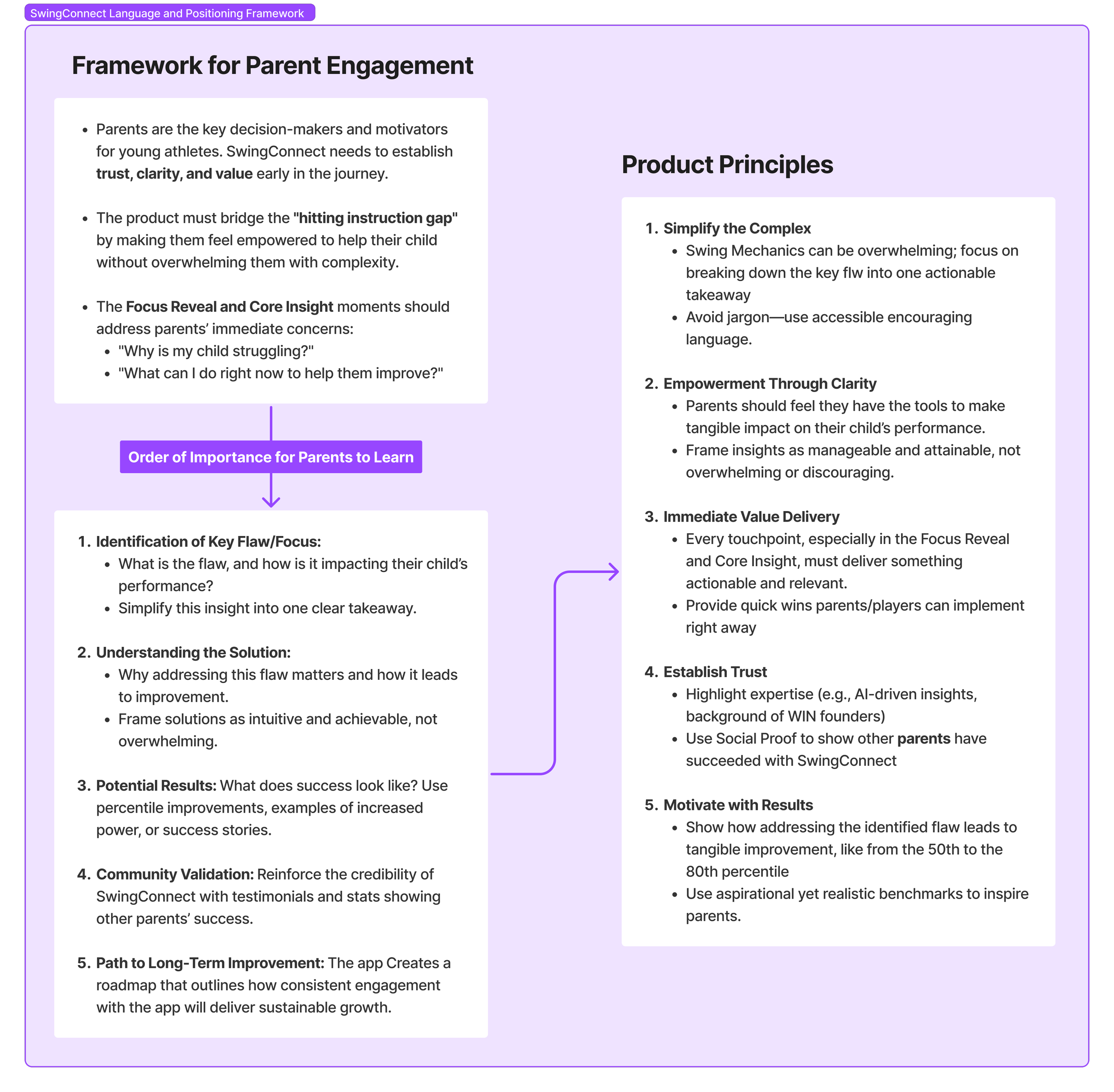
“I’ve tried watching YouTube videos, but they all say different things, and it’s hard to know what actually applies to my kid.”
“I want to help my child improve, but I don’t know what to look for in their swing. I’m not a coach—I just want clear, simple advice I can trust.”
“If I could see measurable improvements, like their swing speed or exit velocity, it would make me feel like we’re really making progress.”
Design and Prototyping
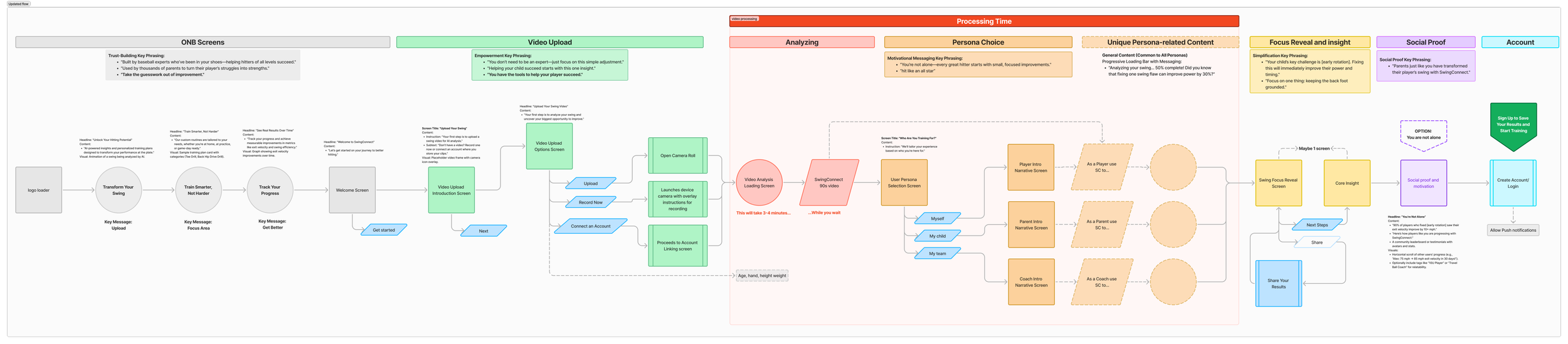
Initial Wireflow
To ensure a seamless and engaging experience, I created wire flows to reduce friction and emphasize value at every step.
Key flows included:
- Onboarding: Simplified with minimal steps to immediately engage users. The flow prioritized video upload/record and introduced users to the app’s core features without overwhelming them.
- Swing Analysis: Designed to provide visually engaging, swing phase-specific insights (Load, Stride, Swing) that were easy to understand and actionable.
- Engagement Loop: Integrated motivational prompts, progress tracking, and milestones to encourage repeat use and long-term engagement.
 View fullsize
Iterative Testing
Multiple rounds of testing were conducted with parents, players, and coaches to validate usability, clarity, and engagement. Based on feedback, iterative refinements were made to improve user flows and ensure alignment with user expectations.
I conducted user testing with parents and coaches to validate:
- Usability: Is the app intuitive for all personas?
- Clarity: Are insights easy to understand and actionable?
- Engagement: Do users feel motivated to continue?
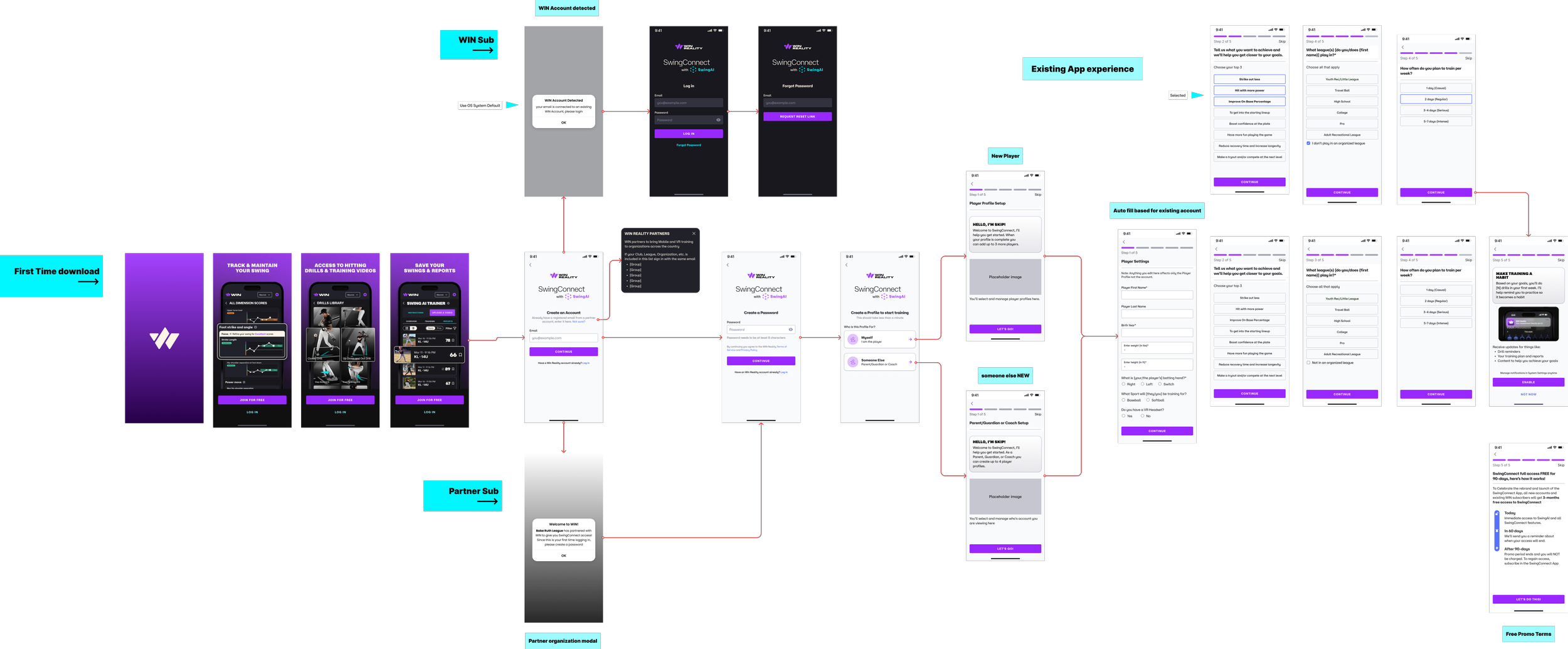
Initial account creation flow
 View fullsize
Key Findings:
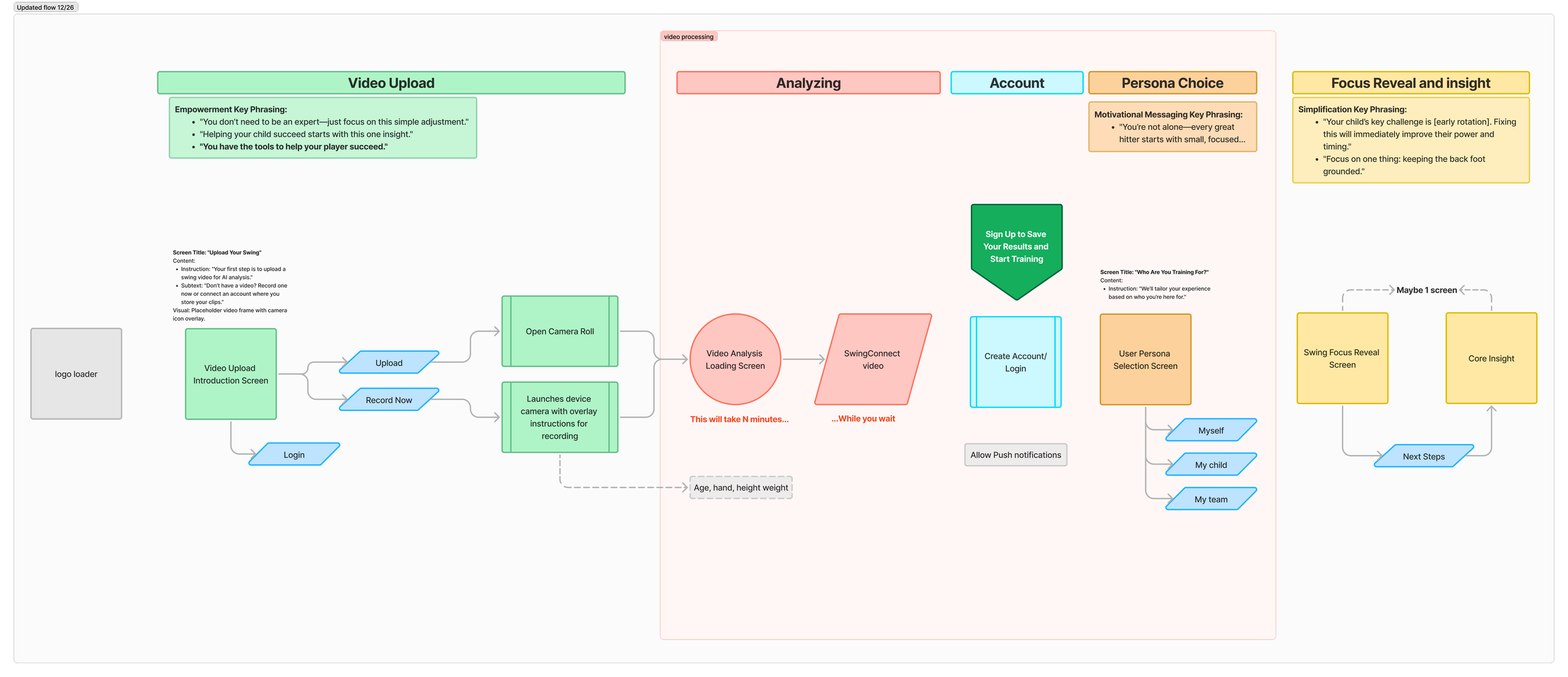
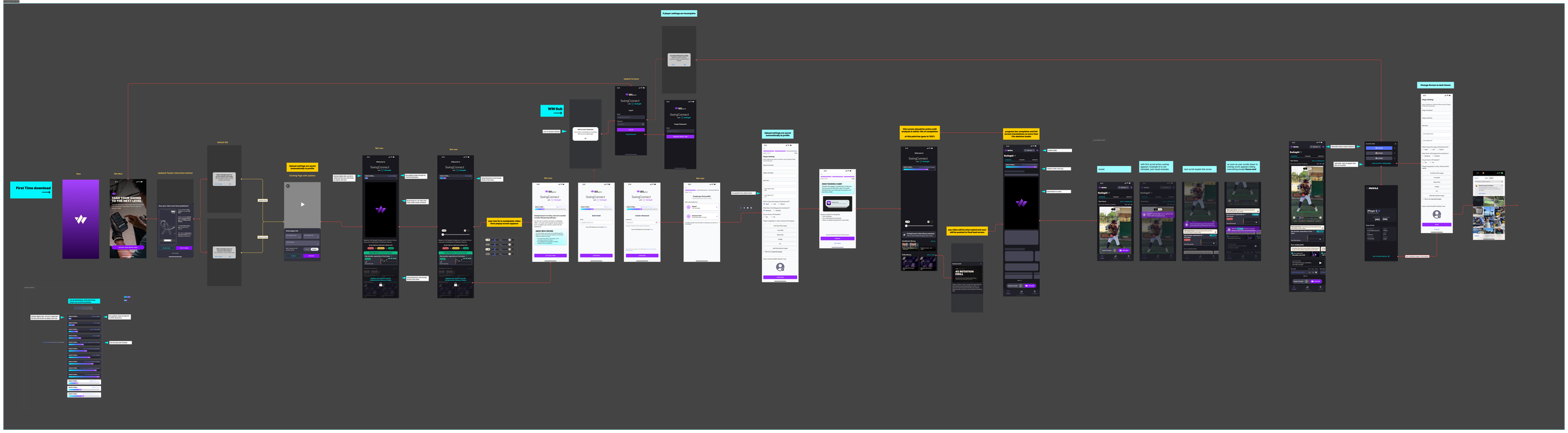
The App Wireflow was updated and revised substantially to emphasize the same activities needed for the core loop and a native record and video upload feature were added to minimize analysis time.
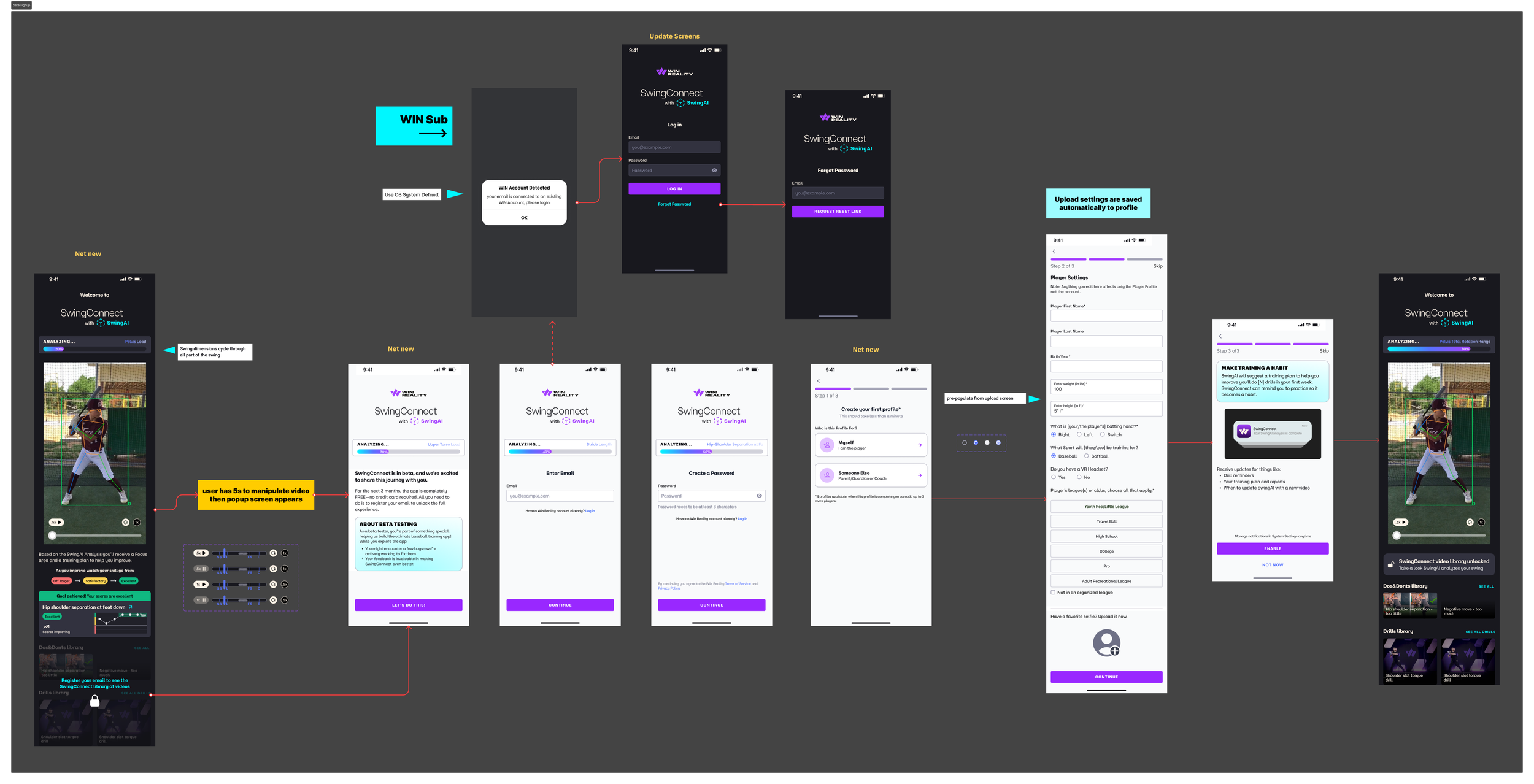
- Deferred Account Creation: Users preferred creating accounts after experiencing app’s value.
- Visual Feedback: They had no patience for personalization without an understanding the time investment needed by the core loop.
- Engaging Wait Times: Interactive content reduced perceived wait time by 32%.
Updated Wireflow based on testing
 View fullsize
Beta Test Launch
Key tasks:
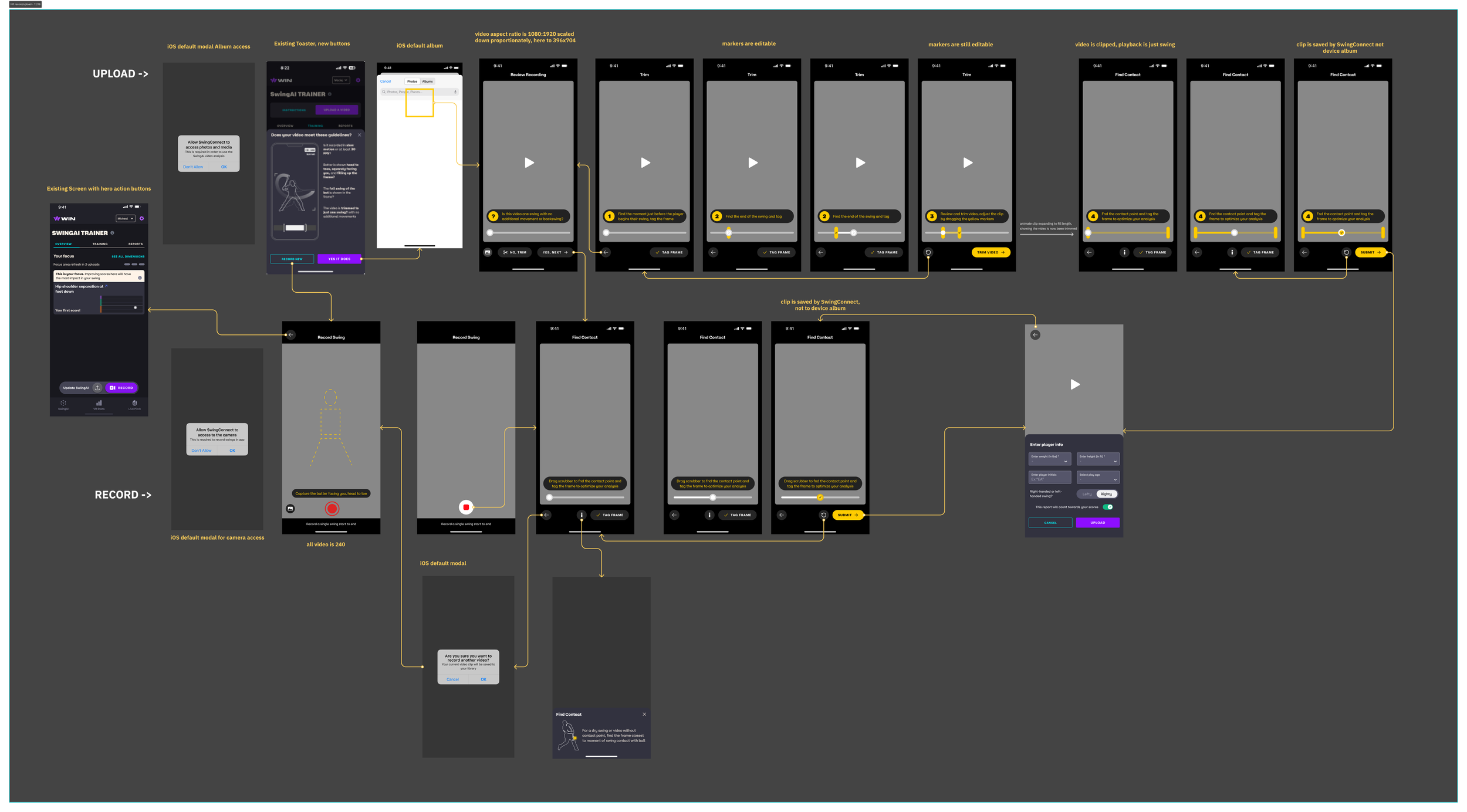
1. Upload Flow
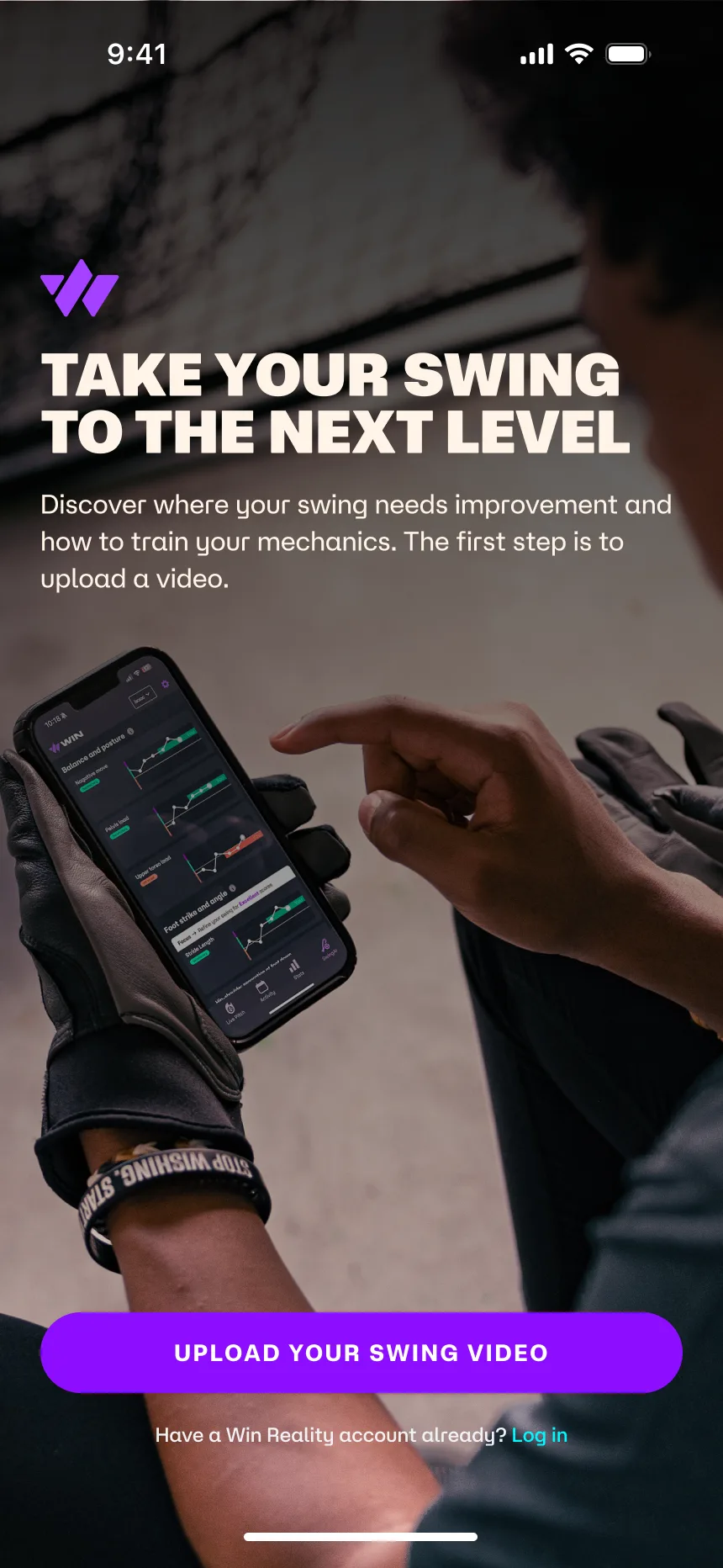
- Start Screen: Users can upload a video or record a new one.
- File Selection: Access iOS photo album to choose a video.
- Trimming & Markers: Edit key points (start/end) and trim videos.
- Review & Save: Final video preview with options to save or proceed to analysis.
2. Record Flow
- Permission Screen: Prompts for camera access.
- Recording Screen: Guides users on framing and recording swings.
- Review Screen: Playback, trim, and save recorded video.
3. Analysis & Results
- Processing Screen: Shows progress while AI analyzes the video.
- Results Screen: Displays swing metrics and feedback.
- Save & Share: Options to save results or share with teammates/coaches.
4. User Profile & Settings
- Profile Setup: Capture player info for personalized insights.
- Settings: Manage preferences, notifications, and support access.
5. Onboarding
- Welcome Screen: Introduction to app features and benefits.
- Tutorials: Optional guides for recording, uploading, and analysis.
Updated Flow
 View fullsize
Impact
Beta Test Metrics
To measure the effectiveness of the relaunch, we tracked key performance indicators (KPIs) across user engagement and retention, as well as satisfaction via an in-app survey.
- Engagement: % of users completed their first swing analysis within the first session, indicating strong initial adoption.
- Retention: % of users returned within 7 days to upload another swing, showcasing continued interest and perceived value.
- User Satisfaction: % of parents reported feeling more confident in supporting their players after using the app.
- Wait Time Perception: Interactive content during AI processing reduced perceived wait time by 32%, improving user experience.
- Understanding of Swing Flaws: Annotated swing visuals increased user comprehension by 30%, leading to better application of suggested improvements.
Conclusion
The SwingConnect redesign successfully addressed user pain points by combining intuitive design, actionable insights, and engaging features.
This project highlights my ability to lead user-centered design initiatives, translate complex data into accessible experiences, and deliver impactful solutions that drive engagement and retention.
Beta onboard detail
 View fullsize
Native video record and upload flow detail
 View fullsize